
Introduction
The Toolbar Panel in codeit contains a search feature that allows you to filter records shown in the Verbatim Panel, by searching for a specific value or text expression.
This can be used, for example, to filter on verbatims that contain a specific word or phrase so all of these verbatims can be quickly coded to a given theme.
Simple Search
To perform a simple search, type the text or expression you want to find in the search box located at the top left side of the Toolbar Panel, then press "Enter" or press the green checkmark to start the search.
The Verbatim Panel will update and only records containing the search text will be displayed.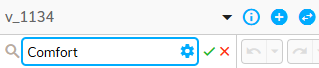
Search Syntax
In addition to simple text searches, the search text box also supports filtering using more advanced expressions.
The search text box supports the standard codeit text expression syntax.
Search Options
The search box also offers a set of search option buttons, for more refined searching.
To access these options, click the settings cog within the search box: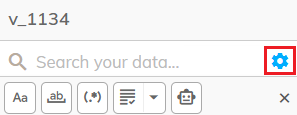
The following table contains a brief description of each of these four options:
| Icon | Option | Description |
|---|---|---|
 | Match Case | Selecting this option will make your filter case sensitive. With this option on, a filter on "female", for example, will not match "Female" values in your data. If this option is not used, filters are treated as case insensitive. |
 | Match Whole Word | Selecting this option will restrict the filter to match your search text as a whole word only. For example filtering on "Cost" will match "Cost" within your data only if it is a whole word, and therefore won't match against "Costly", for example. |
 | Match Regular Expression | Allows you to enter a search pattern, using Regular Expression syntax, rather than a literal text search. |
 | Precise Matching Options | Offers a number of more precise filtering options for more advanced filtering (see table below). |
 | Use AI | Selecting this option will enable a smart AI-based search. The codeit AI will match the exact expression entered and other words with similar meaning. For example, searching for "Comfort" will match words like "Comfy", "Confort", "Comfier", "Cozy" and so on. Note: When using this option, the Verbatim Panel will also display a "Similarity" column indicating how similar the matched records are to the search expression. |
Precise Matching Options
For more advanced searching, the "Precise Matching Options" dropdown offers a number of options. For example, you may want to search for verbatims that start or end with a given value. Or you might want to filter on records that don't contain a certain value.
The following table contains a brief description of these options:
| Option | Description |
|---|---|
| Exact Match | Filters on records that contain the exact search term only within the filter column value |
| Contains | Filters on records that contain the search term anywhere within the filter column value |
| Starts With | Filters on records where the filter column value starts with the search term |
| Ends With | Filters on records where the filter column value ends with the search term |
| Not Equals | Filters on records where the filter column value is different to the search term |
| Not Contains | Filters on records where the filter column value does not contain the search term |
| Includes List | Filters on records where the filter column contains any of a list of specified values |
| Excludes List | Filters on records where the filter column does not contain any of a list of specified values |