
Introduction
The "Brands" tab within the "Coding Tools" panel lists all the brands within the codeframe and displays suggested spelling variations matched to each.
You can use this list to review the typos and variations that have been coded to each brand as well as apply coding suggestions that have not yet been applied. The panel can also be used to filter and review records in the "Verbatim Panel"
The Brands tab within the Coding Tools Panel appears as follows:
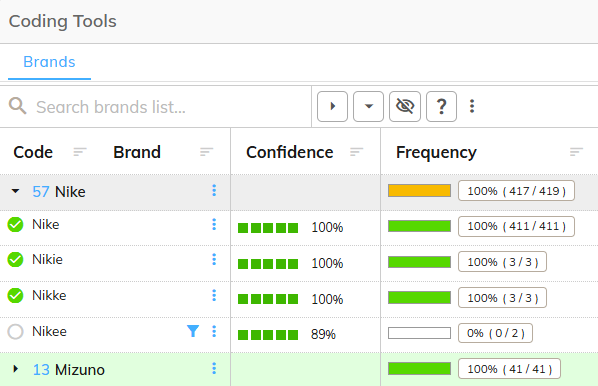
The Brands tab consists of the following sections:
Toolbar
The toolbar provides a way to filter and change the display of the Brands List.
The following table lists the controls within the toolbar and their purpose:
| Icon | Action | Description |
|---|---|---|
 | Search | Filters the list to brands that match the text you type. |
 | Advanced Search Options | Shows extra search options: Match case, Match whole word, Use a Regular Expression, and a match-type menu (Exact Match, Contains, Starts With, Ends With, Not Equals, Not Contains, Includes List, Excludes List, and Clear precise matching). |
 | Collapse all Rows | Collapses all Brand rows within the Brand List so that any coding suggestions within each are hidden. |
 | Expand all Rows | Expands all Brand rows within the Brand List so that all coding suggestions within each are shown. |
 | Show Uncoded Suggestions | Filters the Brands List to coding suggestions that have not been applied, |
 | Show Unassigned Suggestions | Filters the Brands List to just show the Unassigned group: items of text found in the data that are not matched to any brand in the codeframe. Click the button again to show the full list. |
Brands List
The Brands List is a table containing the following columns:
| Column | Description |
|---|---|
| Code/Brand | Contains the code and label for all brands within the codeframe. Within each row is a sublist of misspellings that the codeit AI suggests should be coded as the given brand |
| Confidence | For each suggested spelling, how confident the codeit AI is that the spelling refers to the given brand (for example, an exact match shows 100% and a near-miss spelling might show 89%). |
| Frequency | Shows how many verbatims exist for a given brand/suggestion and the percentage coded/uncoded. |
Brands List - Icons
The following actions are available within the Brands List:
| Icon | Name | Decription |
|---|---|---|
 | Sort Column | Sorts the Brands List by a given column. Sorts Ascending, Descending and Default with each click. |
 | Suggestion Applied | Indicates that a given suggestion has been applied as a code to all of the associated verbatims. Clicking the icon will remove the coding suggestion from all of the associated verbatims. |
 | Suggestion Not Applied | Indicates that a given suggestion has not been applied as a code to the associated verbatims. Clicking the icon will apply the suggestion to the associated verbatims. |
 | Filter on Suggestion | Filter the Verbatim Panel to just show records relating to the suggestion clicked. |