
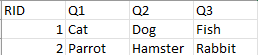
Generally, data loaded to Codeit is what is known as 'Respondent Level Data', whereby one respondent record is imported or exported as one row in the file (e.g. Excel or csv), with the question responses entered in the columns, as per the example shown below.
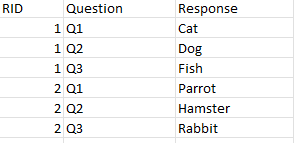
codeit can also handle another format of data called 'Response Level Data', where the answers to each individual question for an ID are shown on separate rows.
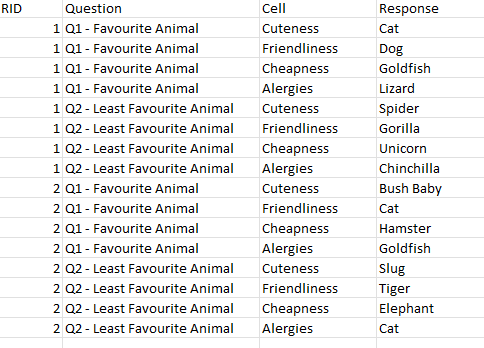
Below we show what this looks like for both standard question responses and for nested data. For each, there are specific options to be chosen upon import to ensure that codeit reads the data correctly.
| Standard Response level data | Iterative response level data |
|---|---|
| Each row contains one ID and one response. Therefore one ID can cover multiple rows determined by the number of questions being imported. Import considerations:
| Each row contains one ID and one nested level response from within a loop. Import considerations:
|
 |  |