Within codeit, Nested data refers to data that has multiple answers that need to be spread across multiple variables for import or export, but need to be read as one question. Nested data can be what's known as 'looped data', where a question is repeated multiple times for example for different statements about a product, it could be ordered data such as first, second, brand aware of, or a more straightforward multicoded format, where multiple answers are given to one question such as "what did you like about the movie?"
Nested data is stored differently in many different data analysis software packages and codeit can handle many of them. This data also usually needs to be referenced within codeit so the import and export tools within it process the data in the right way for the data to be displayed as intended.
When data is exported from a particular software package, the nested data is often 'flattened' to fill multiple columns which are then interpreted and re-nested upon import to the next. codeit does this when importing and exporting nested data (and can also be done after import if necessary). The benefit of this is ease of coding and handling - it is much easier to code these variables as one variable rather than multiple as the question format and usually the codeframe are the same. Even if the nested question is not being coded, it may be used as a context variable when performing a coding task, so the specific 'relative' context layer within the nested data can be displayed.
The examples below outline the different nesting options available in codeit, and why you might want to use each. There is an example data file at the bottom of this page containing nested data for reference.
| Nesting Type | Usage Reason | Example data | codeit Display |
|---|---|---|---|
| Order | Use this nesting type when the fields represent a series of answers given for a single question. | Q1. "What types of animal can you think of?" 1st Mention: "Dog" 2nd Mention: "Cat" 3rd Mention: "Rabbit" | When a variable is nested in this way, Codeit will display each individual value as a separate item for coding. So, in the case of Dog, Cat, Rabbit these three responses will be displayed as 3 separate items each to be coded separately, but within a single variable and coding task. |
| Loop | Use this nesting type when the fields represent different loop iterations within a single question. | Q2. <for each animal mentioned in Q1> "What do you like most about <animal>?" 1st Iteration (Dog): "They are loyal and fun" 2nd Iteration (Cat): "They are cute" 3rd Iteration (Rabbit): "They are soft" | Data nested in this way will be handled and displayed for coding in exactly the same way as Order data (see above). So the difference is largely a matter of expressing intent clearly. However, Loop Nesting gives you additional options when displaying context variables relative to a containing loop. See below for more details. |
| Multicoded | Use this nesting type when, taken together, the fields represent a single, multicoded response to a question. Multicoded Nesting is usually only relevant for variables that will be used a target variables for coding. See more on Multicoded data in separate section above | The verbatim "They are loyal and fun" might be coded as: Code 1 (loyalty) and Code 3 (fun/entertaining). In which case, the data could be imported from two columns: Q2_c_1: Code 1 Q2_c_2: Code 3 | Codeit will treat multiple values joined together as a single multicoded value for a variable rather than import out each field into a separate variable. |
The source data for the above Q1 and Q2 examples would look like this:
| RID | Q1_1 | Q1_2 | Q1_3 | Q2_1 | Q2_2 | Q2_3 |
|---|---|---|---|---|---|---|
| 1 | Cat | Dog | Rabbit | loyal & fun | cute | soft |
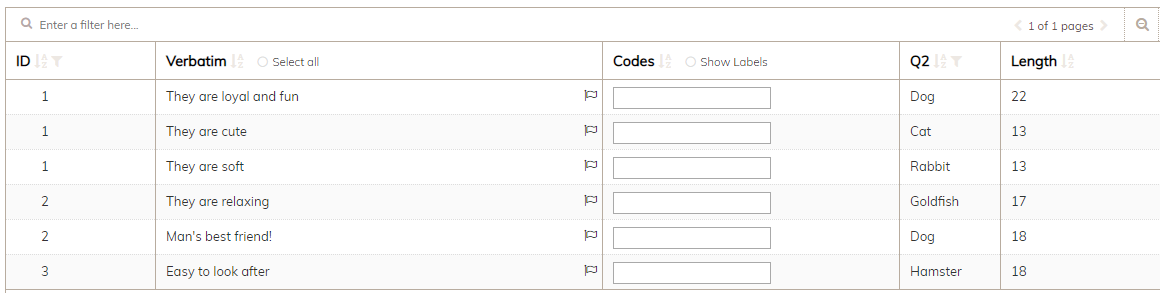
Note that when displaying nested variables as context variables within tasks, you need to select to display the 'relative values' of the question (select within the 'edit context variable' within the codeit Task). In the example above, this will ensure you see 'dog' as the context for 'cute' rather than 'cat, dog, rabbit' as per the screenshot below.