
Introduction
Surveys in Forsta Plus can make use of a closed-end question type such as a Single Choice question with an "Other" label.
There are some special considerations to be aware of if you want to use to codeit to code verbatims when respondents pick the "Other" label.
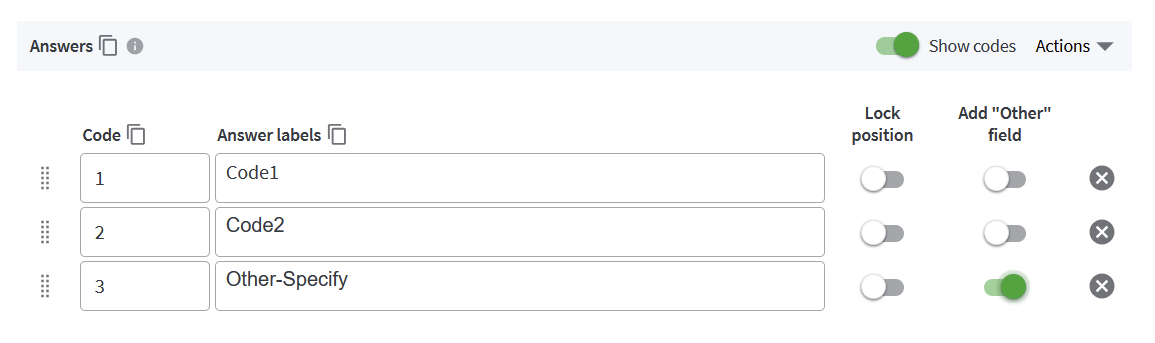
How to setup an Other Specify Question in codeit
In codeit, the closed end variable containing the "Other" field will be available for selection as Source Variables in the codeit data link wizard.
You will also need to create a Target Variable in your Forsta Plus survey for codeit to write the coded data back to, as is standard for the Forsta Plus datalink.
When codeit loads data from Forsta Plus it will load both the pre-coded and other specify responses into the Source Variable in your Task. Do so means that all of the data for the other specify question is written back to the target coded question in Forsta Plus.
Therefore, when you set up your target question in Forsta Plus, you should pre-populate it with all of the closed end responses from the other specify question. This will allow codeit to assign the relevant code to the closed-end responses when the data is loaded.
How to update an Other Specify Question in codeit
Once the question is setup in codeit, the synchronisation process should correctly write back all data to the Target Variable in Forsta Plus.Sometimes you might need to update the closed-end list in Forsta Plus so that the users have more options to choose from. For that case, this is the process you need to follow:
3. From there, if you sync coded data TO codeit, it will recognise any values coded against the added code
4. If you sync TO Forsta, codeit will update "Q1_Coded" and add the new code there.
This will ensure that codeit and Forsta Plus stay in sync for the Other-Specify question.