Introduction
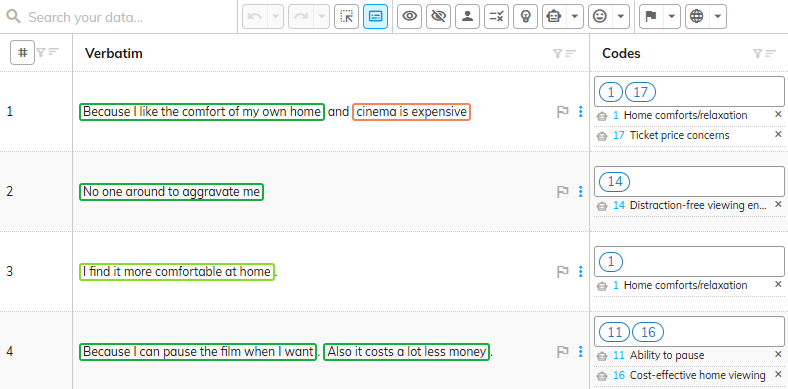
The codeit Verbatim Panel has the ability to highlight segments of text within verbatims that are associated with a theme.
This highlighting is useful for quickly drawing your focus to areas of text that are coded or need user attention.
Steps Required
To switch on verbatim highlighting, press the "Show Verbatim Highlights" button in the Toolbar Buttons.
Highlighting Types
The following table contains a brief description of the types of highlighting that can be displayed:
| Type | Description |
|---|---|
| Coding Suggestions | Highlights sections of text within a verbatim that the codeit AI suggests should be assigned to a theme. Clicking on the highlighted area will apply the relevant theme. |
| Applied Themes | Highlights sections of text within a verbatim that have been assigned to a theme either by the codeit autocoding, or by a user in Advanced Coding |
Example
In the following screenshot, the Show Verbatim Highlights button is toggled on and the highlighting is displayed on verbatims in the Verbatim Panel.