
Introduction
By default, the Manual Coding screen in codeit is displayed with a white background and light blue colours.
If you spend a long time working in this screen, the brightness of the page can be hard on the eyes.
So, as an alternative, you can change the display to Dark Mode which is rendered using a dark background instead.
Steps Required
To change the appearance of the Manual Coding page, follow these steps:
- Click the cog icon in the top right corner of the Toolbar Panel:

- Select the desired appearance from the options available:
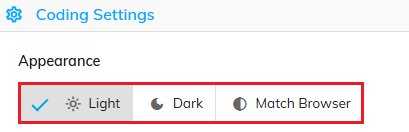
Available Options
The following table contains a brief description of the appearance options available:
| Option | Description |
|---|---|
| Light | Displays using the default light colour scheme of white and blue |
| Dark | Displays using a dark colour scheme |
| Match Browser | Automatically chooses either Light or Dark based on your chosen browser colour scheme |