
Introduction
The codeit AI has the ability to autocode verbatims within the limits of the guardrails set on a project.
Beyond these guardrails, codeit can suggest codes that could be applied but the AI isn't sufficiently confident or is not permitted to apply.
In the Manual Coding screen, you can quickly view these suggestions using the "Show Suggested Coding" button.
Steps Required
To display the available coding suggestions, click the "Show Suggested Coding" button within the Toolbar.
This will filter the Verbatim Panel to show records where coding suggestions exist.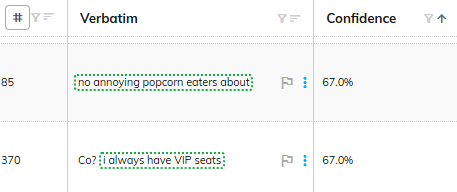
Suggestions will be highlighted by a dotted border, with the colouring of the border denoting the sentiment score attached to the suggestion. Clicking the suggestion will apply the suggested code to the verbatim.
When the suggestions are displayed, a "Confidence" column will also be displayed. The percentage scores within this column denote how confident the AI is about each suggestion.