Introduction
It is often useful to know which words appear and how often within your Verbatims.
This can be a useful guide to the sorts of language, topics and sentiment that are contained within your data.
The Word Counts panel within the Manual Coding screen provides a list of all the words (excluding noise words, like "and", "this", "at" etc..) that appear across all of your verbatims, and the associated count for each.
You can also filter the Verbatim Panel on just those records that contain certain word(s).
Steps Required
To display the Word Counts panel, click the "Word Counts" icon in the Toolbar Buttons.
The Word Count panel will then appear on the right of the screen: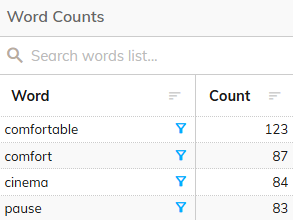
Filtering Verbatims Containing Word(s)
You can use the Word Counts Panel to filter the records in the Verbatim Panel so that it only displays records showing certain word(s).
To filter on a word, click the filter icon next to that word:
Filtering on multiple words will show only those verbatims that contain all of the selected words
Translations
If your verbatim data contains translations, then the translated word list will be displayed by default.
To toggle between the translated word list and the original language word list, click the "Toggle Translations" button: