
The "Word Counts" tab within the "Coding Tools" panel displays a list of all the unique words found within the current verbatims. It also displays a frequency count indicating how many times a word appears within the current verbatims.
The Word Counts can also be used to filter records in the "Verbatim Panel" and show only those verbatims containing certain word(s).
The Word Counts tab within the Coding Tools Panel appears as follows:
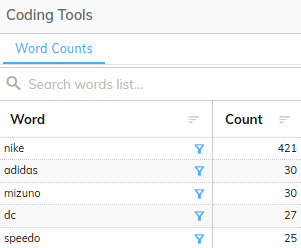
The Word Counts consists of the following sections:
Toolbar
The toolbar provides a way to filter and change the display of the Word Counts.
The following table lists the controls within the toolbar and their purpose:
| Icon | Action | Description |
|---|---|---|
 | Search | Filters the list to brands that match the text you type. |
 | Advanced Search Options | Shows extra search options: Match case, Match whole word, Use a Regular Expression, and a match-type menu (Exact Match, Contains, Starts With, Ends With, Not Equals, Not Contains, Includes List, Excludes List, and Clear precise matching). |
The Word Counts are displayed in a table containing the following columns:
| Column | Description |
|---|---|
| Word | Contains a list of words found within the current verbatim data |
| Counts | Displays a frequency count indicating how many times each word appears, in total, within the current verbatim data |
Brands List - Icons
The following actions are available within the Brands List:
| Icon | Name | Decription | |
|---|---|---|---|
 | Sort Column | Sorts the Word Counts by a given column. Sorts Ascending, Descending and Default with each click. |
>