
Introduction
After you have used the "Run AI" option in codeit, you will most likely want to view the autocoding applied.
This page outlines the steps to follow to do this.
Steps
- From the Start Menu choose the "Refine Coding" option to enter the manual coding screen
- To filter the data on coded verbatims, click the "Show Coded" filter button in the toolbar

This will filter the view and just show verbatims where codes have been applied. - Alternatively, you can click the "Show Coded By AI" button to filter on verbatims that have codes where codes have been applied by the codeit AI.
You can select "All Layers" to view codes applied by any AI method (i.e. Text Matching, Text Rules and Machine Learning) or pick an individual item to focus on one method (e.g. Machine Learning).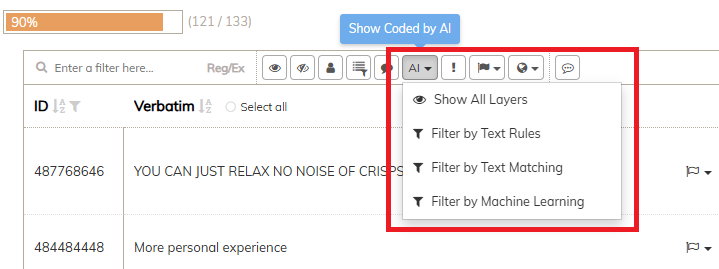
Using this approach gives you a fine-grained method to check individual aspects of the AI output.