
Introduction
The Manual Coding screen in codeit is getting a facelift.
This is quite a big job, so we're keen to get feedback from our users along the way.
So, today we are making the first version available for our Beta Testers to try out.
Why is this changing?
The short answer is that we want to make the Manual Coding screen better.
The new version will be cleaner, faster and easier to use.
For example, we're updating the codeframe editor to make it consistent with the newer codeframe editor in the "Refine Codeframe" page. This brings features like drag & drop for reordering and merging codes, undo/redo functionality and a compact, sleek design.
We've also changed the layout of the verbatim data, so it is no longer divided into separate pages. Instead, verbatims appear as one continuous list which is much easier to navigate.
How do I access it?
As a member of the Beta Testers program, you will see a banner in the Manual Coding screen which will take you to the new version.
Within the Manual Coding screen, you can also switch to the new version by clicking on the "Mode" ribbon button and clicking the "Manual Coding v2.0" option.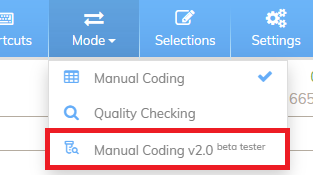
How do I provide feedback?
If you have any feedback on this new feature, or any aspect of codeit please email: feedback@codeitsoftware.com and let us know your thoughts.