Introduction
Within the Codeframe Panel settings in codeit you have the option of toggling on or off the "Show Child Items in Matching Nets" setting.
Show Child Items Explained
This setting controls which Themes are displayed when performing a Text Search on a Codeframe.
If this setting is not enabled, then the search results will only include items that contain the search text.
So, if a Net matches the search then it will be displayed and Themes within that Net will only be displayed if they also match the search text. Sometimes this display is not very helpful, because you lose the contextual information about the Themes within the Net.
If the setting is enabled, the search results will include all Themes within a matching Net regardless of whether those Themes also match the search text.
Example
Consider the following example search for the word "Cost".
With the "Show Child Items" setting disabled, the search matches the "Cost and accessibilty" Net and only displays Themes within that Net if they also contain the word "Cost":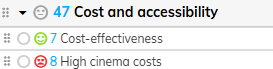
Alternatively, with the setting enabled, all Themes within the "Cost and accessibility" Net are displayed regardless of whether they contain the word "Cost":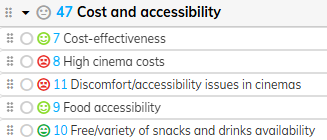
Steps Required
To change the "Show Child Items in Matching Nets" setting, follow these steps:
- Click the cog icon in the top right of the Codeframe Panel
- Toggle on/off the "Show Child Items in Matching Nets" setting within the Search section: